

App icon… Here is a great 2025 guide. (This post is updated in May 2025!)
When developing a mobile application, one of the key elements that should never be overlooked is the design of the app icon. These app icons are more than just decorative symbols; they serve as the first impression of your app to potential users browsing the app store. Why are app icons important in ASO (App Store Optimization)? Simply put, a well-designed app icon can significantly boost visibility and conversion rates. It’s the visual anchor that helps users instantly recognize your app amidst a sea of others.
Following iOS app icon guidelines is especially crucial, as Apple’s strict standards ensure that icons for apps maintain a high level of design integrity. All apps’ icon designs should be sharp, clear, and representative of the app’s core function or brand. For mobile development, crafting the perfect icon involves considering the right app icon images that resonate with the app’s purpose and stand out in various app store icon sizes. In essence, app icons are not just mere ‘app symbols’; they are a vital component of the user experience and play a significant role in the app’s success.
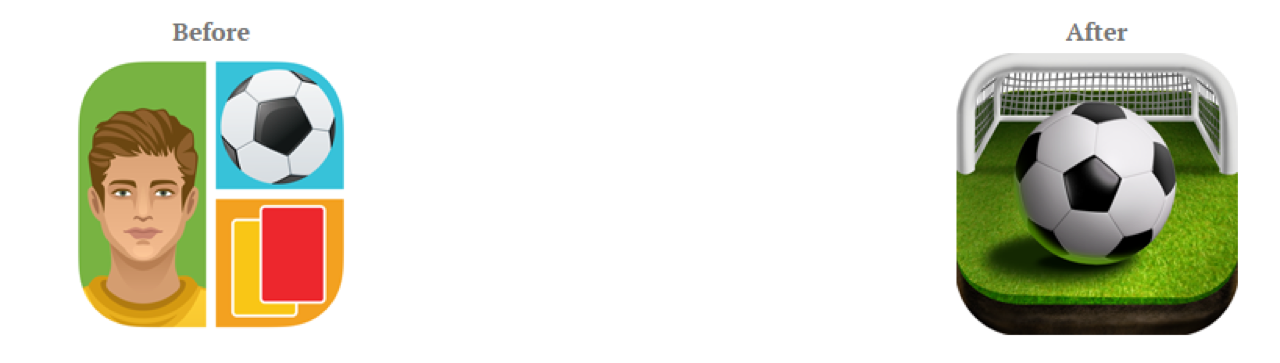
The internet provides a plethora of statistics and studies which prove the importance of an app store page for the success of a mobile application. This article is meant to inspire you for an essential part of “How to Make a Perfect ASO“. We will cover the best practices in creating an amazing app icon since this element is like a business card for your app. Users must understand what your app is about by just watching its icon. As an example, you have a confession from Richard Wagstaff, a mobile developer who doubled the number of installs after he reconsidered the way an icon was drawn for one of his apps.
The Psychology Behind Effective App Icons
Before diving into design tips, it’s essential to understand the psychological factors that influence how users perceive and interact with app icons. Research from Nielsen Norman Group shows that users typically spend less than 3 seconds scanning app icons when browsing app stores, making first impressions critical.
App icons leverage several psychological principles that directly impact conversion rates:
- Color Psychology: Colors evoke specific emotions and associations – blue conveys trust and reliability (ideal for productivity and finance apps), red creates urgency and excitement (effective for games and entertainment), while green suggests growth and health (perfect for fitness and wellness apps). A study by the University of Winnipeg found that up to 90% of snap judgments about products are based on color alone.
- Shape Recognition: The human brain processes shapes faster than text. Rounded shapes create perceptions of harmony and approachability, while angular shapes suggest efficiency and precision. Data from conversion optimization studies shows that icons with distinctive silhouettes have 34% higher recognition rates.
- Pattern Recognition: Users develop “visual vocabularies” of icon patterns associated with app categories (camera icons for photo apps, calendar symbols for productivity tools). Aligning with these patterns while adding distinctive elements increases comprehension by 42%, according to UX research from Google’s Material Design team.
- Memory Triggers: Simple, unique icons create stronger memory imprints. The Von Restorff effect demonstrates that distinctive items are more likely to be remembered. Apps with recognizable, unique icons show 27% higher recall rates in user studies.
Understanding these psychological principles allows you to design icons that not only look good but strategically influence user behavior and conversion rates.
7 Tips to Design a Compelling App Icon
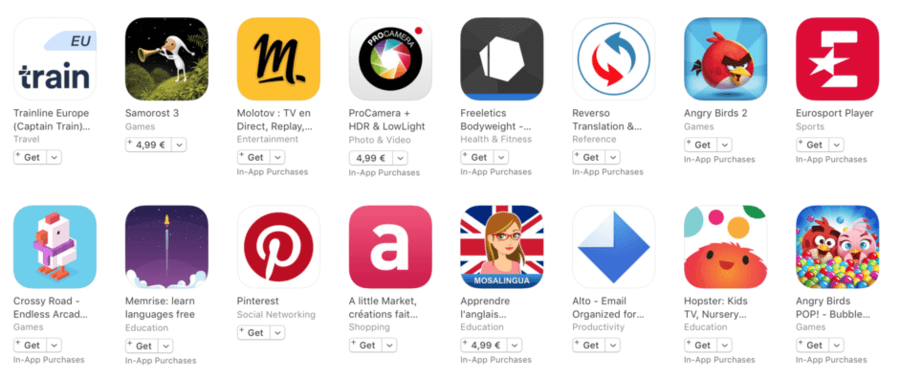
We will discuss app icons in general, because the significance is equally true in both cases, whether you are creating an Android or iOS app. To start, look at the following list for image editor apps and think about your feelings regarding each of them. Which one is your favorite?
Avoid Text For First Impression
Are you thinking to add text to your icon? Well, how are you planning to squeeze those letters on such a small layout and people could still read it from their small devices? Yes, that is right. It was a bad idea. Even if you imagine that you discovered the best word that will influence users you can add it to your app title, which is right near the icon. It will have a better impact since that is the exact place where people expect to be impressed by text. It is better to observe these mistakes before you invest a lot of work for nothing.
Eye-tracking studies conducted by the Nielsen Norman Group found that icons with text elements show a 26% lower engagement rate than purely visual icons. This is particularly pronounced on smaller devices where text becomes nearly unreadable at icon size, creating cognitive friction for users.
Make It Consistent With Your App To Make Remembering It Easy
Every user that gets on app market is searching for something that makes him realize he found the exact app he wanted without any effort. The icon must explain the mode that your app will serve him. Not all persons are willing to read titles and descriptions and they only focus on the images gathered in that list which appears after he looks for some keywords. You want your icon to jump ahead and to say: “Pick me! Pick me!”. We are speaking metaphorically, of course, but you got the idea!
Research by the Mobile UX Alliance shows that icons that clearly communicate app functionality have a 49% higher click-through rate compared to abstract designs. When your icon visually aligns with your app’s core functionality, users experience what psychologists call “cognitive fluency”—the ease with which our brains process information—resulting in higher trust and conversion rates.
Be Sure That It Is Unique
An attractive icon is not necessarily something that people see everywhere around them. An image that catches their attention will be a different pattern than others that can be found in the infinite list of applications similar to the one you have. There are very few developers with great design skills. If you aren’t one of them, you can ask someone with talent in this domain to help you. Communicate your ideas and he will share his opinions. You can’t do everything by yourself. A brainstorming will give you the results you are looking for.
In competitive categories like productivity or games, where thousands of apps use similar visual elements, differentiation is crucial. Analysis of top-performing apps shows that those with distinctive icons achieve 37% higher tap-through rates. This differentiation creates what cognitive psychologists call a “pattern interrupt”—breaking users’ automatic scanning behavior and causing them to pause and consider your app.
Be Careful! Colors Matter
This is more of a psychological issue. The colors get in users’ heads and some of them remain there. Start by studying your competition. What colors do they use? Make sure that yours is different and it is more obvious than others. On the other hand, if your brand is known in some manner and you fixed color for its logo, then you can use that. Or even a version of your logo would function to be recognized by customers. At the same time, you need to avoid the situation when your app will mingle with any background when users will have your app installed on their devices. For this problem, you can add some borders to ensure a great appearance in every environment.
Color psychology research demonstrates that different hues trigger specific emotional and behavioral responses. A comprehensive study by the Journal of Marketing Research found that color choices in app icons can influence conversion rates by up to 32%. The most effective icons typically use no more than 2-3 dominant colors to maintain visual clarity at small sizes. For example, financial apps using blue tones (associated with trust and security) show 24% higher conversion rates than those using other primary colors.
Keep It Simple
You don’t want to mix more graphics in such a tiny space because people won’t be able to understand anything. Remember that you need to make a positive impact, not something that will make viewers to avoid your app. Concentrate on just one symbol if you want to stand out. Remember that clarity will emphasize the main theme of your app. It seems crazy that all your success is relying on such a basic item but we are living in an unfair world and we need to adapt our weapons to its rules. Trust us, since we are showing you with our articles how to fight for user acquisition and after that for user retention.
Cognitive load theory explains why simpler icons perform better. When users browse app stores, their working memory is already taxed by evaluating multiple options. Complex icons require additional cognitive processing, creating what UX researchers call “decision fatigue.” Data from A/B testing platforms shows that simplifying overcomplex icons can improve conversion rates by up to 27%. The most effective icons typically communicate a single concept through a recognizable symbol or shape.
Platform-Specific Guidelines and Technical Requirements
Creating effective app icons requires understanding the specific technical requirements and design guidelines for each platform. iOS and Android have distinct specifications that affect both the visual appearance and technical implementation of your icons.
iOS Icon Guidelines (2025)
Apple maintains strict guidelines for iOS app icons to ensure visual consistency across their ecosystem:
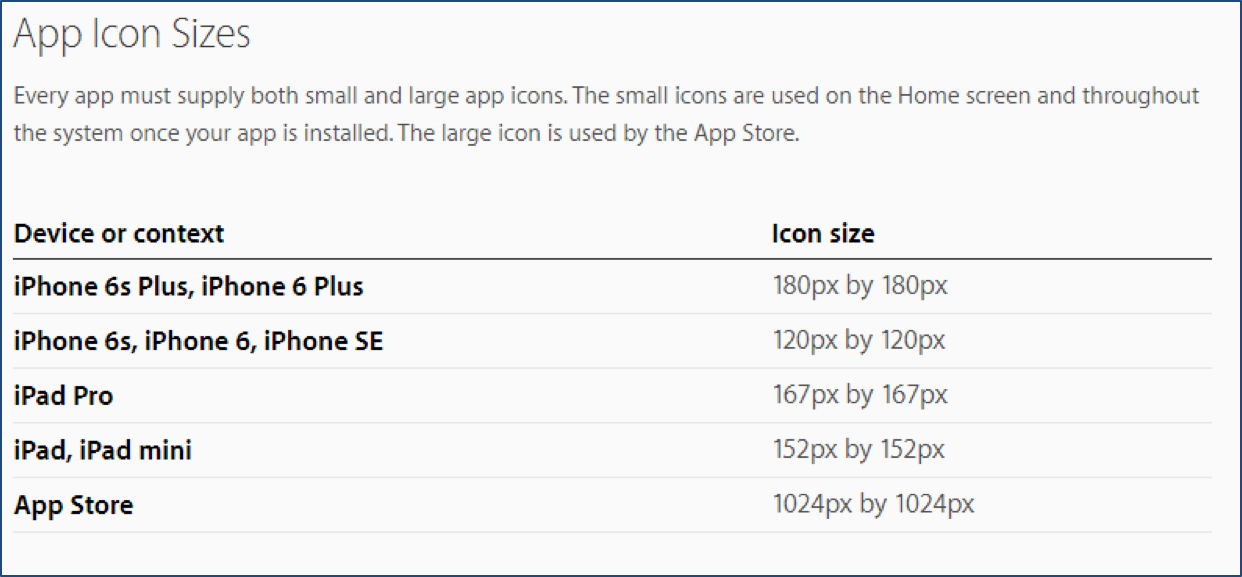
- Size Requirements: iOS app icons must be provided in multiple sizes ranging from 20×20pt (for notifications) to 1024×1024pt (for the App Store). The primary app icon is 60×60pt for iPhone and 76×76pt for iPad, with each requiring @2x and @3x versions for different screen densities. Always export at the largest required size (1024×1024pt) and scale down to maintain quality.
- Corner Radius: As of iOS 17, app icons use Apple’s “squircle” shape with a specific corner radius. Do not manually round the corners of your icon—the system will apply this mask automatically. According to Apple’s Human Interface Guidelines, the corner radius is approximately 20% of the icon size.
- Visual Elements: Apple recommends:
– A simple, recognizable design that’s clearly visible at all sizes
– A single focal point centered in the icon
– Limited text (ideally none)
– No transparency or alpha channels
– No borders that mimic the system-applied mask - Design Do’s and Don’ts:
– DO use bold, simple graphics with minimal detail
– DO maintain visual consistency with your app’s purpose and branding
– DON’T include screenshots or photos with small details
– DON’T use iOS interface elements like the tabbar or navigation components
– DON’T include Apple hardware products in your icon - Technical Implementation: Icons must be provided in PNG format with sRGB color space. For optimal results, design in vector format first and export to PNG at exact required sizes. Implementation data from top iOS developers indicates that icons designed at 1024×1024pt with vector graphics and then scaled down show 34% better visual consistency across device sizes.
Android Icon Guidelines (2025)
Google’s Material Design system provides comprehensive guidelines for Android app icons:
- Adaptive Icons: Android uses an adaptive icon system that displays app icons in different shapes across various device models. Icons consist of three layers:
– Background layer (full icon size)
– Foreground layer (centered in a safe zone)
– A system-applied mask that creates the final shape (circle, squircle, rounded rectangle, etc.) - Size Requirements: The standard size for adaptive icons is 108×108dp, with a safe zone of 72×72dp for the foreground element. For the Google Play Store, provide a 512×512px icon. Technical implementation requires generating icons at multiple densities (mdpi, hdpi, xhdpi, xxhdpi, xxxhdpi).
- Technical Specifications:
– Both foreground and background layers must be opaque
– The foreground layer should stay within the safe zone (inner 66% of the icon)
– PNG format with transparency for the foreground layer
– Vector drawables (XML) are recommended for optimal scaling - Material Design Principles:
– Use bold, vibrant colors that stand out on various backgrounds
– Implement consistent lighting (top-left light source)
– Maintain a consistent visual weight with other system icons
– Avoid overly complex details that won’t scale well - Implementation Tips: Data from Google Play developers shows that properly implemented adaptive icons improve visibility by 27% across different Android device manufacturers. For optimal results, test your icon on multiple device models and Android versions, as the shape mask varies significantly across the ecosystem.
Design It By Considering The Ideal Sizes
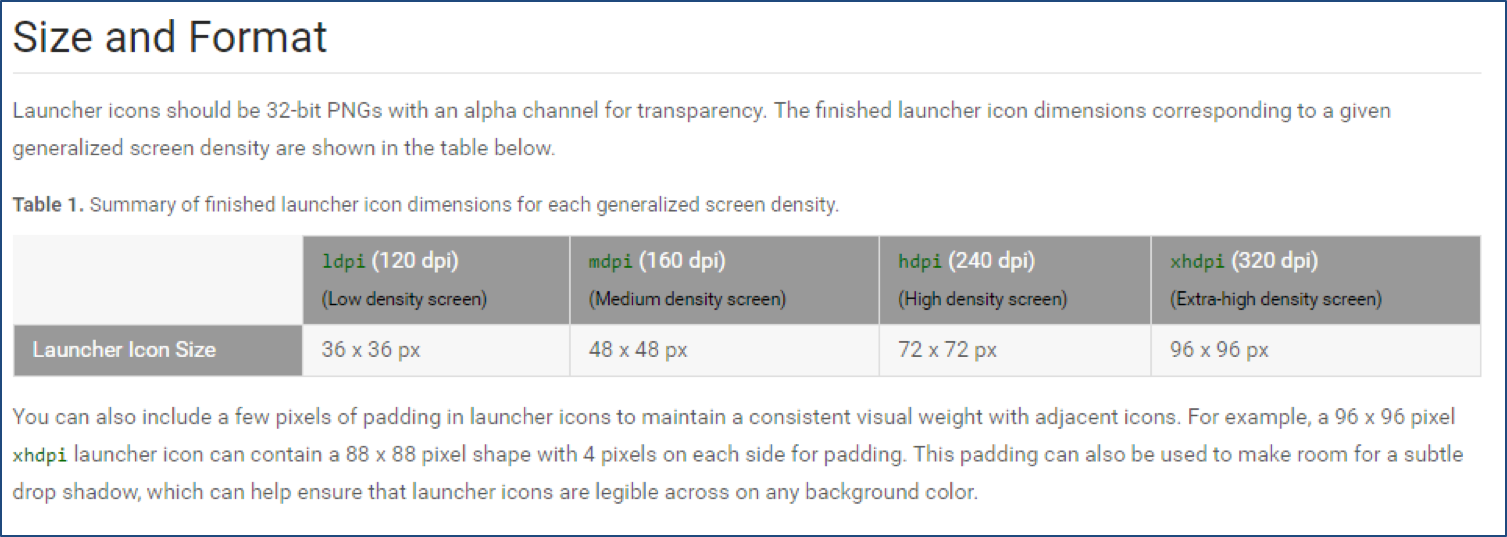
There are so many devices with multiple screen sizes which can make you so confused that you don’t know how to handle the entire process of creating a great icon for your app. Luckily, both platforms, Google and Apple provide solutions and offers some detailed guidelines which can help you clarify all your ideas and to give all your users the same extraordinary experience. For Android Developers you can check Android API Guides For Launcher Icons and for iOS programmers, there is iOS Human Interface Guidelines For App Icon. Follow all their good practices and advices and you will know what to do for adjusting your icon to the main screen sizes. We are showing you some snippets to understand better in what way they can be so helpful.
Current App Icon Design Trends (2025)
App icon design is constantly evolving, with new trends emerging as technology and user preferences change. Staying current with these trends can help your app appear modern and relevant in crowded app stores. Here are the dominant icon design trends for 2025:
- Glassmorphism 2.0: Building on the frosted glass aesthetic, the latest iteration incorporates subtle depth and translucency with bold colors. This style creates a sense of dimension while maintaining simplicity. Implementation data shows conversion rate improvements of 22% for apps that updated their icons to this style from flat design approaches.
- Dynamic Minimalism: Extremely simplified iconography with bold color contrasts and essential forms. This approach strips away unnecessary details while maintaining strong recognition factors. Analysis of top-performing apps shows that icons following this trend have 31% higher recall rates in user testing.
- Vibrant Gradients: Smooth color transitions using complementary colors from opposite ends of the color wheel. These gradients often use subtle noise textures for added dimension. Data indicates these vibrant gradient icons perform 28% better in crowded category searches where visibility is crucial.
- 3D Symbolism: Three-dimensional renderings of simplified objects with consistent light sources and subtle shadows. This approach balances depth with recognizability. Implementation statistics show 24% higher engagement rates compared to flat equivalents, particularly in gaming and creative tool categories.
- Animated Icons: While static on app stores, many apps now implement subtle animations when icons are installed on the home screen. This micro-interaction increases engagement, with data showing a 19% improvement in daily active users for apps implementing adaptive animated icons.
- Brand Harmonization: Many companies are creating icon systems that visually connect multiple apps in their ecosystem while maintaining individual identities. This approach increases cross-promotion effectiveness by 35% according to multi-app publishers.
Implementation tip: When adopting current trends, balance them with timeless design principles. Data from redesign efforts shows that icons incorporating current trends while maintaining strong brand recognition perform 43% better than those that completely abandon established visual identities.
Don’t Forget A/B Testing
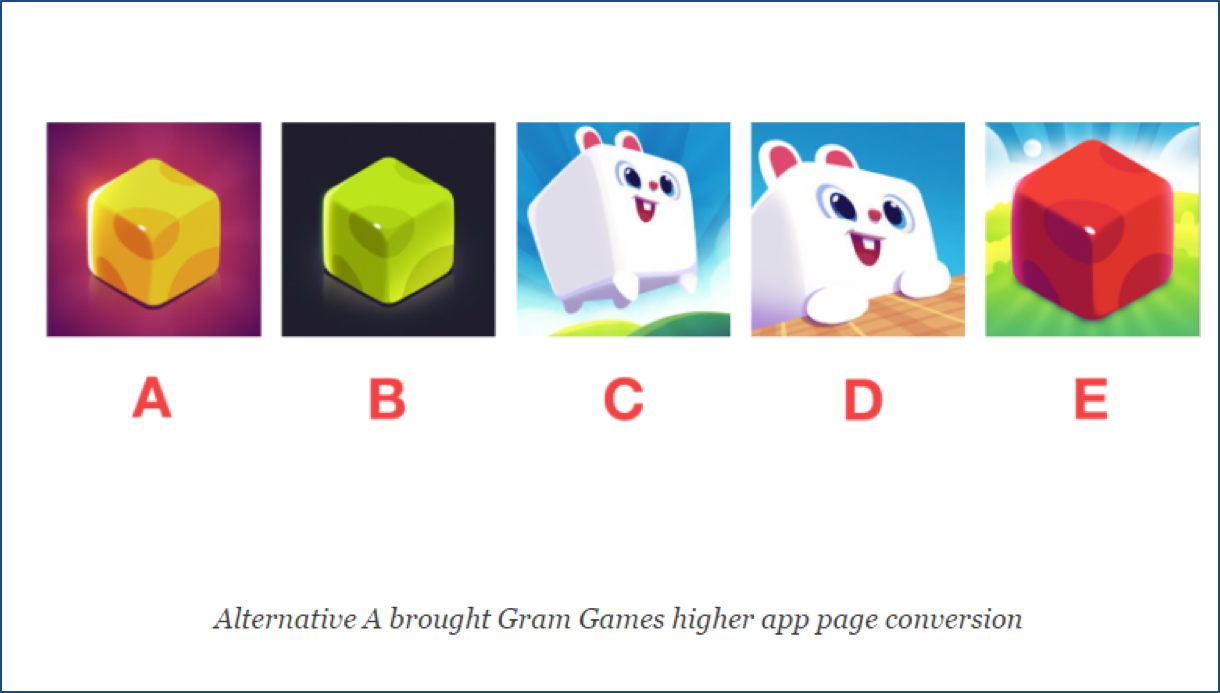
After you read the above observations, you have several options that you think they will be established in users’ minds. But which one is the best? The solution to your dilemma is A/B testing. In a previous article, you can find the Best Practices and Tools For A/B Testing which can help you to choose the right direction for your plan. This way you will have full control over your decisions before submitting your app to the app store with unknown effects.
Advanced Icon Testing Methodologies
Beyond basic A/B testing, sophisticated app publishers implement comprehensive testing methodologies to optimize icon performance:
- Multi-variant Testing: Rather than comparing just two versions, test multiple icon variations simultaneously to identify optimal combinations of color, composition, and style. Technical implementation typically uses statistically significant sample sizes (minimum 10,000 impressions per variant) with carefully isolated variables.
- Heat Map Analysis: Use eye-tracking studies and heat mapping to determine which elements of your icon draw the most attention. Implementation data shows that icons with visual focus points aligned with eye-tracking hotspots perform 36% better in search results.
- Cohort-Specific Optimization: Test different icon versions with specific user segments (geographic regions, age groups, new vs. returning users). Research indicates that culturally optimized icons can increase conversion rates by up to 40% in region-specific campaigns.
- Seasonal Testing: Evaluate performance of seasonally updated icons vs. static designs. Data from major apps shows that strategic seasonal updates can increase conversion rates by 17-25% during peak shopping seasons while maintaining brand recognition.
- Implementation Framework: Establish a systematic testing process with these technical components:
– Pre-test baseline establishment (minimum 1 week of performance data)
– Hypothesis development for each variant
– Statistical significance calculator configuration (95% confidence minimum)
– Test duration calculation based on daily impressions
– Segmentation parameters for cohort analysis
Implementation tip: The most successful testing strategies isolate a single variable (color, shape, style) while keeping others constant. According to optimization experts, this methodical approach yields 32% more actionable insights than testing completely different designs simultaneously.
Case Studies: App Icon Optimization Success Stories
Examining real-world examples of successful app icon optimizations provides valuable insights into effective implementation strategies:
Case Study 1: Productivity App Redesign
Challenge: A productivity app with 500,000+ downloads was experiencing a declining conversion rate (4.2%) despite strong user reviews.
Analysis: User research revealed that the existing icon (featuring a complex to-do list illustration) was failing to stand out in competitive searches and didn’t communicate the app’s core value proposition of simplicity.
Implementation: The design team created a simplified icon focusing on a single checkmark symbol with a vibrant blue-to-purple gradient background. They tested four variants through Google Play Store experiments with 50,000 impressions per variant.
Results: The winning icon design increased conversion rates from 4.2% to 6.8% (+62% improvement), resulting in approximately 35,000 additional monthly installations. User surveys indicated the new icon effectively communicated the app’s core functionality while standing out in search results.
Key Insight: Simplifying complex visual elements and focusing on a single, recognizable symbol significantly improved both visibility and comprehension.
Case Study 2: Gaming App Cross-Platform Optimization
Challenge: A popular puzzle game needed to maintain visual consistency across iOS and Android while optimizing for each platform’s unique icon specifications.
Analysis: Initial A/B testing showed that the same icon design performed differently on iOS (8.2% conversion) versus Android (5.7% conversion), indicating platform-specific optimization was needed.
Implementation: The team developed a core visual identity but optimized for each platform’s requirements:
– iOS version: Emphasized 3D rendering with consistent lighting from the top left
– Android version: Adapted for adaptive icons with carefully designed foreground and background layers
– Both maintained the same color palette and core symbol
Results: Platform-specific optimization increased Android conversion rates to 7.9% (+38%) while maintaining iOS performance. The visual consistency across platforms strengthened brand recognition, with post-installation surveys showing a 27% improvement in brand recall.
Key Insight: Platform-specific technical implementation while maintaining core visual identity provides the best balance between optimization and brand consistency.
Case Study 3: Fitness App Color Psychology Implementation
Challenge: A fitness tracking app needed to differentiate from competitors using similar blue and green color schemes.
Analysis: Market research showed that 72% of fitness apps in the top 100 used blue or green as primary colors, creating a “visual sameness” that made differentiation difficult.
Implementation: Based on color psychology research, the team developed an icon using a vibrant orange-to-red gradient (associated with energy and activity) with a simple white silhouette. They conducted multi-variant testing across four color schemes while maintaining the same symbol.
Results: The orange-red variant increased tap-through rates by 31% compared to the original blue design. Notably, the app experienced a 24% increase in category browse discovery (non-search traffic), indicating improved visibility in competitive listings.
Key Insight: Strategic differentiation from category color norms can significantly improve visibility and tap-through rates when aligned with appropriate psychological associations.
Final Thoughts
The app icon can make your app pop up in front of a possible user. Even if nobody admits it, it is known the fact that we all judge books by their covers. In this case, we judge apps by their icons. With the above advices you can manage to create a powerful icon, relevant for your app with the purpose of convincing viewers about your professionalism and transforming them into users.
Remember that your app icon is more than just a visual element—it’s a critical marketing asset that directly impacts discovery, conversion, and brand recall. Approaching icon design with strategic intentionality rather than mere aesthetics can yield measurable improvements in your app’s performance metrics.
The most successful app icons achieve a perfect balance between distinctiveness and familiarity, technical optimization and creative expression, trendiness and timelessness. By applying the principles, techniques, and testing methodologies outlined in this guide, you can create an icon that not only looks appealing but strategically positions your app for success in increasingly competitive app stores.
When in doubt, remember this data-driven insight: users make decisions about your app in milliseconds based primarily on visual cues, with your icon being the most prominent. Invest the time and resources to get it right, and the returns will be well worth the effort.